

What Crestron Automate VX does
Crestron Automate VX is a voice-activated, multi-camera switching system for boardrooms, town hall spaces, training rooms and other large meeting spaces. Microphones in the room, most often ceiling arrays, report where each person is speaking. Automate VX then cuts to a camera assigned to that position and, with visual AI turned on, keeps the speaker framed in the center of the shot as the conversation moves around the room.
mtc is the leading Automate VX dealer in Japan. Our IVC-E and CM-IVC-E certified engineers design, install, commission and support Automate VX systems ourselves, and we pair most of them with Shure MXA920 ceiling array microphones. This guide sets out how the system works and what it needs, based on the Crestron documentation and our own installations.
Last reviewed 21 September 2026 against Automate VX software 6.7.0.17.
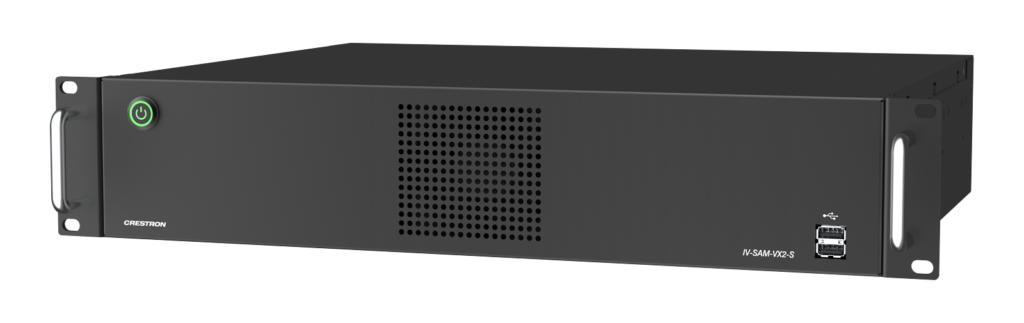
Automate VX (IV-SAM-VX2-S). The Automate VX Pro (IV-SAM-VX2-P) has the same 2U chassis size.
Automate VX at a glance
12
cameras on an Automate VX Pro (IV-SAM-VX2-P) over NDI|HX, or 7 over SDI. The processor also has one USB camera input.
5
cameras on an Automate VX (IV-SAM-VX2-S) over NDI|HX, or 3 over SDI. The processor also has one USB camera input.
99
room configurations per system, for divisible and multipurpose spaces
15 min
at most for AutoMeasure to calibrate camera and microphone positions
How Automate VX chooses the shot
Automate VX starts with sound. The microphones report which position is active, a camera moves to that position, and the output cuts to it when the camera arrives at the shot, so the move itself is not normally shown. If no spare camera is free, the output holds a still image while the camera moves. Once a shot is live, Reframing can move the camera to keep a moving speaker centered.
Microphones locate the talker
Positional arrays such as the Shure MXA920 report each talker position as coordinates. Lobe microphones report which lobe picked up the voice, a DSP reports which wired or wireless microphone is open, and discussion systems report which delegate microphone is live.
Virtual Mics map the room
Each seat or speaking position is a Virtual Mic in the Room Designer software, with a primary and a secondary camera. The secondary is a backup, and Automate VX also uses it when it can reach the shot faster than the primary.
Clean cuts
Since software 5.8, the output switches when a camera arrives at its target position. Timers ignore short noises (Noise Delay), hold a shot after someone stops talking (Pause Delay) and delay the cut so that camera movement stays off the output (Switch Delay).
Visual AI framing
AutoFraming centers the speaker and Reframing keeps them centered as they move. When turned on, Face-Presence Check stops the output switching to a shot that has no face in it. Visual AI works with 1 Beyond p12 and p20 cameras, and with i12 and i20 cameras set to Use as PTZ.
Face Direction
When a speaker turns, Face Direction can switch to a camera that is facing them, but only when the new angle is more than 10 degrees better than the current shot.
Default shots and priorities
A default shot, which can be a composite of several cameras, takes over after a set time with no audio detected. Conversation Mode shows two speakers side by side, and a Priority Mic gives one chosen position, such as the chair, precedence over the others.
Microphones
Pairing Automate VX with the Shure MXA920
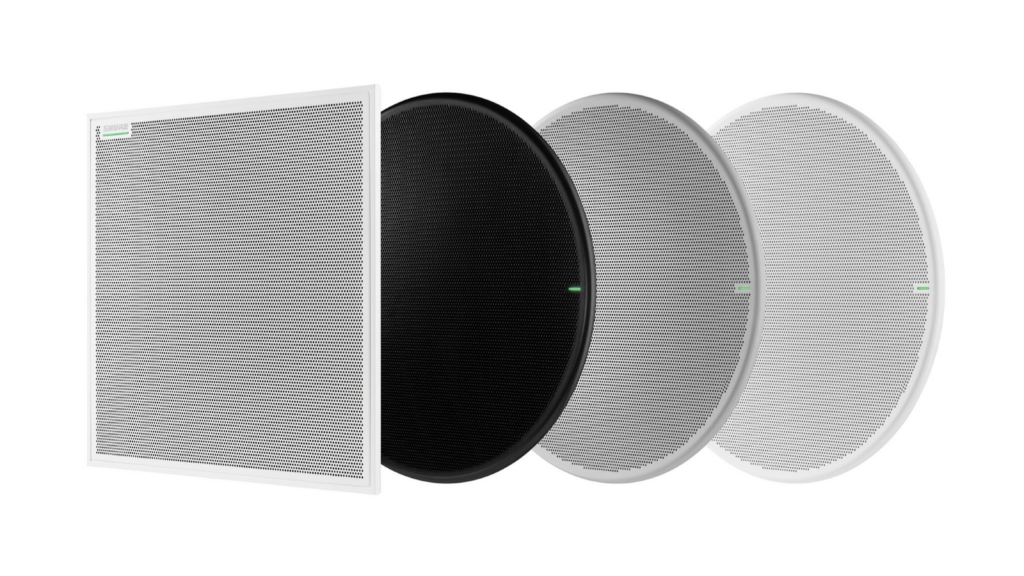
Most of our Automate VX rooms use Shure MXA920 ceiling array microphones. In positional (XYZ) mode the MXA920 reports the X, Y and Z coordinates of each talker, and Automate VX uses them to decide which Virtual Mic, and so which camera shot, to call. Lobe mode is also available, with Virtual Mics matched to the lobes set in Shure Designer.
- Since software 5.9, Automate VX sets the MXA920 height from the room design, so the microphone height (Z) entered in Room Designer has to be measured from the face of the microphone to the floor, not assumed.
- Noise Threshold, which sets how loud a sound has to be before it triggers a Virtual Mic, works only with the MXA920 in XYZ mode, the Sennheiser TCC2 and TCC M, and the Yamaha ADECIA RM-CG.
- AutoMeasure, the camera-based calibration tool, supports the square MXA920 and the Sennheiser TCC2.
- Microsoft Teams mute is supported with the MXA920, P300 and IntelliMix Room from software 6.2.2.27.
- Crestron tested software 6.7.0.17 with MXA920 firmware 6.10.0.
- The MXA925, which Shure describes as an enhanced successor to the MXA920, is supported from the same release. Crestron does not yet list a tested MXA925 firmware version, and the Noise Threshold and AutoMeasure lists do not include it.
- With more than one array in a room, a DSP acts as the adjudicator that decides which microphone is closest, and blocking zones cover the space between the arrays.
- For most rooms, Shure recommends a talker distance of up to 4.9 m (16 ft) and a mounting height of up to 3.7 m (12 ft). For camera tracking, Shure suggests about 3 m (10 ft) between the array and the talkers for single-talker framing, with the array installed level.
Choosing between the VX2-S and the VX2-P
The number of cameras decides the model more than the size of the room. Crestron shows a two-camera boardroom as a VX2-S design, and any room with six SDI cameras needs a VX2-P.
| Automate VX (IV-SAM-VX2-S) | Automate VX Pro (IV-SAM-VX2-P) | |
|---|---|---|
| Cameras over SDI | 3 | 7 |
| Cameras over NDI|HX | 5 | 12 |
| USB camera | 1 | 1 |
| Panasonic AW-UE100, AW-UE150A, AW-UE160 | Not supported | With the third-party camera key, plus an Automate VX Care plan where available |
| Program output | 3G-SDI, converted to USB for the room codec, plus one NDI|HX output | Same |
| Recording | MP4 (H.264) up to 10 Mbps on a 316 GB SSD | Same |
| Network | 3 × 2.5 GbE | Same |
| Rack and power | 2U, 400 W, 100 to 240 V AC | Same |
1 Beyond cameras for Automate VX
| Camera | Zoom | Field of view | 0.9 m wide shot up to | Presenter tracking | Suited to |
|---|---|---|---|---|---|
| p12 (IV-CAM-P12) | 12x | 67.68° | 8.5 m (28 ft) | No | Medium to large rooms |
| p20 (IV-CAM-P20) | 20x | 56.45° | 18.3 m (60 ft) | No | Large to extra-large rooms |
| i12 (IV-CAM-I12) | 12x | 67.68° | 8.5 m (28 ft) | Yes | Group framing in medium to large rooms, presenter tracking in medium training rooms |
| i20 (IV-CAM-I20) | 20x | 56.45° | 18.3 m (60 ft) | Yes | Presenter tracking in large to extra-large training rooms, group tracking in large to extra-large conference rooms |
- Place p12 or p20 cameras in pairs, as close together as possible, so one can move while the other is live.
- Use i12 or i20 cameras only where presenter tracking is needed. Crestron says one is typically enough for a room, covering the presentation area.
- The current software manual lists no NDI output for the i12, so check before specifying one in an all-NDI design.
- Run every camera over SDI or every camera over NDI. Crestron says never to mix the two, and to use NDI above seven cameras or with more than one Automate VX.
- Rooms with more than 12 cameras add a Blackmagic ATEM switcher.
- The 1 Beyond i12D is a speaker-tracking camera with its visual AI built in, so it needs no external system. The current Automate VX documentation does not list it as a supported camera.
Network and installation requirements
The Automate VX2 processors run Windows 11 IoT Enterprise and have three 2.5 GbE ports: one for the internet and two for a control system or local networks. In our experience, getting the network right at design stage avoids most commissioning problems.
| Port | Role |
|---|---|
| ETH1 | Internet connection. Crestron uses this port for browser and Remote Desktop access, and online services such as updates and XiO Cloud rely on the internet access it provides |
| ETH2 | Control system or another local network |
| ETH3 | Camera and microphone switch (Crestron also allows a control system or local network here). Every 1 Beyond camera needs a network connection to this switch, even when its video runs over SDI |
Services and ports
| Service | Port | Notes |
|---|---|---|
| Web interface and REST API (HTTPS) | 4443/TCP | The default since software 6.4.1 |
| Web interface (HTTP) | 3579/TCP | Legacy only; new installations do not support it |
| Crestron control (CIP) | 41794/TCP | IP table default; 41796 for secure CIP, and 41795 for the secure Crestron terminal protocol |
| 1 Beyond Camera Manager | 554, 5000, 5002, 5500/TCP | RTSP video, application ports and VISCA over IP |
| NDI | 5353/UDP, 5960 upwards | mDNS discovery, then one port for each NDI source |
| Streaming | 1935/TCP, 2935/TCP | RTMP and RTMPS |
| Crestron Remote (remote support) | Not listed in the Crestron PDFs | Supported from software 6.5.0; Crestron says to use it in place of Windows Remote Desktop |
- Crestron states that cameras, microphones, DSPs and the control system must be on the same VLAN as the Automate VX. That VLAN can be isolated from the corporate network. If the processor sits on the corporate network, Crestron recommends opening the ports in its Security Reference Guide, which also lists the Wirecast ports.
- All three ports use DHCP by default. 1 Beyond cameras need static IP addresses.
- Cameras and microphones take PoE+ from the switch in every Crestron design example. Cabling should be shielded Cat5e or better.
- The program output leaves on 3G-SDI and passes through the supplied INOGENI SDI2USB3 converter, on firmware 8.96 or later, into the USB input of the room codec. The HDMI and DisplayPort connectors are for a configuration monitor only.
- A display or the EDID emulator has to be connected, or recording fails.
- Crestron does not publish IGMP, multicast bandwidth or PoE budget figures for Automate VX, so we size the switch from the camera and microphone specifications on each project.
How we deploy and commission Automate VX
Crestron requires the purchase of Remote Professional Services (IV-PROSERVICE-1B) with each Automate VX2. The service supports the deployment remotely and validates up to three room configurations, with an AV technician on site while the Crestron team works. For Crestron Intelligent Video Certified Engineers (IVC-E) who deploy and validate the system themselves, buying the service is optional, subject to verification by Crestron. Our two IVC-E engineers and one CM-IVC-E carry the whole process in-house:
- Design the room in Crestron Intelligent Video Room Designer: a floor plan at the correct scale, camera and microphone positions, and a Virtual Mic at each seat.
- Rack the processor and connect the cameras over SDI or NDI, the ETH3 camera switch, the ETH1 uplink and the EDID emulator.
- Accept the license at first boot, replace the default password (there is no password recovery), run Windows Update once and bring Automate VX to the current release.
- Give every camera a static IP address in Camera Manager 2, name it to match its camera number and check its firmware against the release minimums.
- Set up the microphones and DSP: XYZ or lobe mode on the MXA920, gating and hold times, an echo cancellation reference to each array, and, on a Biamp or Q-SYS DSP, an audio delay of 400 ms for lip-sync, raised towards 450 ms with NDI cameras if testing shows it is needed.
- Build the Virtual Mics, primary and secondary cameras, blocking zones and default shot, then run Proximity Check and Shot Visualization.
- Run AutoMeasure where the microphones support it, and re-run it or measure by hand if accuracy is below 75 percent.
- Configure the outputs, layouts, sleep and wake actions, the control system IP table and XiO Cloud.
- Validate every seat with AutoSwitch Preview and Live Mode, covering camera tracking, microphone sensitivity, lip-sync and control from the touch panel. The exported design file and a support package go into the handover record.
Automate VX on its own, and with other Crestron products
Automate VX works as a standalone system with any conferencing codec that accepts a USB camera. It also records, streams over RTMP and offers a REST API for third-party control. Combined with other Crestron products, each part does the job it was designed for.
Collab Compute and Crestron Flex
Crestron lists the VX2-S and VX2-P as validated hardware for Collab Compute. The Automate VX output reaches the room computer as a USB camera through the SDI to USB converter, and the Crestron design examples pair it with a UC Engine.
DM NAX
A DM-NAX-AP-100 audio processor can pass talker positions from Sennheiser TCC M and TCC M Plus arrays to Automate VX. In the Crestron High-Impact Spaces design example, a DM NAX amplifier is part of the room audio system alongside Automate VX.
DM NVX and DM NUX
From software 6.5.0, Crestron supports extending the USB output of the SDI to USB converter over DM NVX with USB routing, or over DM NUX. In the Crestron design example, DM NVX also distributes content around the space.
AirMedia
AirMedia handles wireless presentation from laptops, tablets and phones in the same room. Crestron documents no direct link between the two, so each does its own job alongside the other.
Control and touch panels
A Crestron control system connects over CIP on port 41794 and can start or stop AutoSwitch, recall scenarios and room configurations, and run recording and streaming from a touch panel. Several control systems can connect at once.
XiO Cloud
From software 6.5.0, XiO Cloud shows status, pushes firmware, reboots units, collects logs and manages licensing and scheduled actions.
What we check before ordering
We confirm these points at design stage.
- The processor is rated for 100 to 240 V AC, which includes the 100 V supply in Japan. Crestron supplies a US power cord in the box.
- The Crestron documentation lists FCC, IC, CE and Intertek (US and Canada) marks only, and no Japanese marks such as PSE or VCCI. We check Japanese compliance for the processor and its power cord at design stage.
- Crestron Remote Professional Services are delivered remotely and still need an onsite technician. Our engineers deploy and validate Automate VX in person, and work with your team in English and Japanese.
- Crestron publishes the Automate VX documentation in U.S. English. We have not found a Japanese edition of the documentation or a Japanese user interface.
- Panasonic AW-UE100, AW-UE150A and AW-UE160 cameras need the third-party camera key on a VX2-P, which Crestron links to an Automate VX Care plan where that plan is available. We confirm availability for Japan on each project.
- Yamaha ADECIA RM-CG ceiling microphones are supported as positional microphones, which suits projects that standardize on Yamaha audio.
- Windows updates install between 02:00 and 04:00 local time, and the system also reboots daily, so we set the system time zone to Japan time.
The numbers that decide a design
The numbers we work to, all taken from the Crestron documentation.
| Topic | Rule |
|---|---|
| Model | VX2-S for up to 3 SDI or 5 NDI cameras; VX2-P for up to 7 SDI or 12 NDI cameras |
| More than 12 cameras | Add a Blackmagic ATEM switcher |
| SDI or NDI | Never mix them. Use NDI above 7 cameras, with more than one Automate VX, or in divisible rooms |
| Cameras | Two p12 or p20 cameras as close together as possible; typically one i12 or i20 in a room, for the presentation area |
| Camera reach | A 0.9 m (3 ft) wide shot up to 8.5 m (28 ft) with a p12 or i12, and up to 18.3 m (60 ft) with a p20 or i20 |
| Camera angle for visual AI | Within 60 degrees of the direction speakers face |
| Lighting | At least 500 lux |
| Keep out of shot | Displays and glass, where faces can be framed by mistake |
| Extra-large room | 12 or more participants |
| Divisible room | One Automate VX per section, NDI cameras, and one VX2-P acting as primary when the room is combined |
| Microphones | Array count set by Proximity Check; one microphone per talker for other systems; no more than 2 or 3 open microphones |
| Lip-sync | An audio delay of 400 ms in a Biamp or Q-SYS DSP, which may need to rise to 450 ms with NDI; test on site |
| AutoMeasure | All cameras within 7.6 m (25 ft) of Microphone Device 1, and an accuracy of 75 percent or more |
| Room configurations | Up to 99 per system |
Frequently asked questions
Yes. Automate VX sends its program output over 3G-SDI to a converter that presents it to the room codec as a USB camera, for example on Crestron Flex, a UC Engine or Collab Compute. The 2025 Crestron Automate VX sell sheet describes it as certified for Microsoft Teams software and as supporting Zoom Rooms.
Positional arrays from Shure (MXA920, MXA925, MXA901), Sennheiser (TCC2, TCC M, TCC M Plus), Yamaha (ADECIA RM-CG) and Audio-Technica (ATND1061); lobe microphones such as the Shure MXA910 and MXA310; wired and wireless microphones through a Shure, Biamp or Q-SYS DSP; and discussion systems from Shure, Televic, Taiden, Bosch and Audio-Technica. Pendant microphones are not compatible.
Not as a supported Automate VX camera. The i12D is a speaker-tracking camera with two 4K PTZ cameras, a 4K reference camera and a built-in microphone array, and its visual AI needs no external system. The current Automate VX documentation does not list it as a supported camera.
Crestron requires it with each Automate VX2, and it covers remote deployment support and validation of up to three room configurations. For Crestron Intelligent Video Certified Engineers (IVC-E) who deploy and validate the system themselves, buying it is optional, subject to verification by Crestron. mtc has two IVC-E engineers and one CM-IVC-E.
Three ports: ETH1 for the internet, ETH3 for the camera and microphone switch, and ETH2 for a control system or another local network. Cameras, microphones, DSPs and control belong on the same VLAN as the processor, cameras need static IP addresses, and the web interface runs on HTTPS port 4443.
Yes. Each section gets its own Automate VX, the cameras run over NDI, and one VX2-P acts as the primary when the room is combined. Separate room configurations, up to 99 per system, can be recalled from a control system or the web interface when the partition moves.
Crestron releases updates through the Automate VX installer and, on VX2 units with internet access, through Windows Update. Automatic updates are on by default. The current release is 6.7.0.17, dated 9 September 2026.
Sources
Technical details on this page come from these documents. Where sources disagree, we follow the newest.
- Crestron, Automate VX Software Product Manual, doc. 9487H, September 2026
- Crestron, Product Manual, IV-SAM-VX2 Series, doc. 9488B, July 2024
- Crestron, Automate VX 6.7.0.17 release notes, September 2026
- Crestron, Security Reference Guide, IV-SAM-VX2 Series, doc. 9497A, June 2024
- Crestron, IV-SAM-VX2-P spec sheet, 2024
- Crestron, Automate VX sell sheet, 2025
- Crestron, High-Impact Spaces Design Guide, 2025
- Crestron, CCC Series Manual, Supported Hardware (online)
- Crestron, IV-CAM-I12D-B product page
- Shure, MXA920 user guide, version 1.8 (2026-H)
- Shure, MXA920 command strings
- Shure, MXA925 product page